
gts_base_menu
Ceci est une ancienne révision du document !
GTS Base menu
If Base contains only one vehicle it will be rezzed automatically. If there are 2 or more, user will have to click on base to get a menu to choose witch vehicle to rez. Owner and helpers get the owner menu that has a “Touch” button to get to choice menu.
Base menu
- Turn OFF to turn the system off till you click on it again
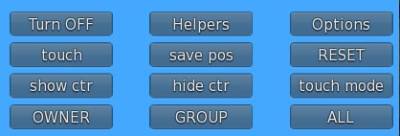
- Helpers manage list of Helpers, ppl you allow to use owner menu
- Options More rarely used functions (see below)
- touch Gets owner/helper same effect as non-owner touching the base
- save pos save position of vehicle
- RESET reset system
- show ctr show the counters above base number of vehicles rezzed since…
- hide ctr hide the counter
- Touch mode switch the base tou touch mode. no vehicle is rezzed till someone touches the base. This mode comes automatically when there are more than one vehicles in base
- OWNER set access to tour to owner only
- GROUP set access to tour to owner and group
- ALL set access to tour to all

Options menu
- Short Name define a short name for a vehicle in base.
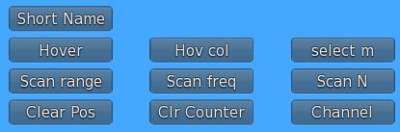
- Hover turns overtext off or on
- Hov col set color of overtext
- select m define the “select vehicle” message
- Scan range change the distance base checks for existing vehicle
- Scan freq change how often it checks
- Scan N change how many negatives checks before base will rez a new vehicle
- Clear Pos clear all saved vehicle positions
- Clr Counter clear the counter and “since” date
- Channel Change the communication channel. in case two bases operate in same area change channel in one

Helpers menu
helpers are ppl you allow to operate the rezzer menu and vehicles menu
- List get a list of helpers

- Add add a helper. you get asked for his UUID
- Delete delete a helper
- Del ALL delete all helpers

gts_base_menu.1691794929.txt.gz · Dernière modification : de admin