
Ceci est une ancienne révision du document !
Table des matières
Add2Them
Version 1.2 This product needs RLV
You run a show and want all artists (friends or alts) to wear specific attachments all at same time. Give them all a relay, instruct them to set #RLV folder as needed. A click on your controller and all change.
You can wear several controllers to target several avatars differently.
Relays can be set to receive commands from several controllers with different owners
Controller includes a relay for you
To use the Add2Them system your viewer and your targets viewer must have RLV enabled.
the Add2Them relay this product uses is designed only for this It does not expose you to any other rlv action
Here we call Targets the agents that will add or detach items. They must wear a Add2Them Relay. You as owner can also be a target. All targets must have in inventory root a folder named #RLV.
#RLV folder

- Inside #RLV folder you will create subfolders for every context you need and name them ~name. ie: ~scene
- Inside this folder you create folders named ~Set0 to ~Set19
- you don't need to make them all. Just the one you will use
- Inside the Set folders you put items or link to items to wear
Controller

- Add2Them Controller has 20 buttons for the 20 sets. It comes in two versions of buttons alignement
- A relay is included. little black square over menu
- You can put textures on buttons to help you.
- A 10 sec click on menu will restore the numbers
- A 2 sec click on a set will tell you the set number
- Button edges become red when set is worn
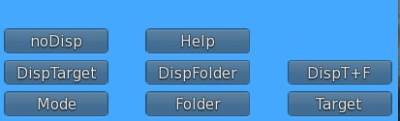
Menu let you set some parameters
- Target - Then enter one of these :
- “me”, only you will receive commands
- “all”, you and everyone wearing a relay that allows you
- “others”, everyone wearing a relay that allows you But not you
- A specific agent by entering their uuid
- Folder - what rlv folder to use. enter scene and it will use ~scene
- Changing Target or Folder while a set is worn is allowed but nor recommanded
- Mode - Add, you can select multiple sets. Replace, selecting one will detach others
- DispFolder - Show selected folder over the hud
- DispTarget - Show selected target over the hud
- DispT+F - Show selected folder and target over the hud
- noDisp - Show nothing over the hud
- Click ◄ arrow to reduce the controller
- Controller is locked when a set is on. detach all of them before detaching the controller

Relay
Add2Them Relay is just a little black box. it goes red when locked while sets are worn. Back to black 15 sec after everything was detached. When you click it, it tells you who can control it. If needed Click and hold 2 sec to clear all and set you free.
If you wear a controller you don't need to wear a relay.
Relay must be prepared before you use it or give it out
- Wear the Add2Them relay and edit it
- In contents open the notecard named “allow”
- Enter UUIDs of avatars allowed to control that relay, one per line
- Then you may want to make the relay next owner no-modify before you pass copies
- There is also a allow notecard in the relay prim of the controller. you don't need to add your UUID in this notecard, only other controllers you want to accept if any.
Relay receives commands on a special channel in the format cmd|folder|set
- If the folder does not exist nothing is done
- In replace mode, all sets from same folder will be detached
- The set specified will be added or detached